

After paying your bills, the next step may not be investing. Use personal finance tools to review what you owe, what you’ve saved, and what your goals require. Keep essential bills current, then weigh extra debt payments against building savings and investing, based on interest costs, cash reserves, and your time horizon.
It’s understandable if the choice feels like a tug-of-war: paying down debt can reduce what you owe, savings can provide a cushion, and investing can support longer-term goals. A clear view of your cash flow makes these trade-offs easier to assess, without assuming one choice is right for everyone.
This guide explains how to compare debt, savings, and investing, then use budgeting, bill and subscription tracking, and goal-planning resources to organize your next steps. You’ll also see how retirement planning fits into the picture, connecting everyday money decisions with the future you’re working toward.
Key Takeaways
- Compare debt payments, savings, and investing by looking at interest costs, available cash, and how soon you’ll need the money.
- Choose budgeting tools that help you review spending, organize bills, and understand how transactions affect your plans.
- Set a clear savings goal and use a regular transfer to make progress part of your routine.
- Review recurring charges and spending categories to spot services you no longer need and purchases that may be easier to plan for.
- Connect near-term money decisions with longer-term goals, including retirement, so your financial plan reflects what matters to you.
What Can You Do With Personal Finance Apps?
Personal finance tools include budgeting apps, bank and credit union apps, spreadsheets, bill trackers, and savings calculators. Each serves a different task: spreadsheets can map irregular income, while transaction trackers group spending and generate reports.
Start with the decision you need to make. Use a budgeting app or Google Sheets workbook to plan monthly spending. For account balances and recent transactions, check your financial institution’s app or website. A calendar can track bill dates, while a savings calculator can help estimate progress toward a goal.
U.S. bank and credit union apps generally focus on accounts held at that institution. Third-party apps may show spending across accounts, depending on their features and connections. If you use both, compare transaction categories and balances so your budget reflects the same activity.
Compare ease of use, cost, security, device compatibility, and connections to bank and credit accounts. Test a tool with a real task, such as finding last month’s grocery spending or listing upcoming bills. Keep using it if its reports make the task clearer.
For spending, bills, and subscriptions, pair a transaction tracker with a due-date calendar. Review monthly and annual charges, label recurring payments, and mark services you still use. Categories can show how much regular spending goes toward each bill or subscription.
Irregular paychecks call for a plan based on timing. Record income when it arrives, list essential expenses by due date, and reserve money for bills between paydays. For example, a freelancer can use a spreadsheet to separate rent money from flexible spending after each payment.
Budget reports can also help with emergency planning. Review essential costs, then set a savings target that fits your cash flow. If your income changes, update the plan when each deposit arrives instead of assuming the next paycheck will match the last.
- For manual budgeting: Use Google Sheets or Excel to list income, expenses, and due dates.
- For account activity: Use your bank or credit union app to review its accounts.
- For recurring charges: Combine transaction categories with a calendar to track bills and subscriptions.
Consider privacy before connecting accounts. Automatically syncing banking information with an expense-tracking app can expose account credentials. Before using a tool, review how it connects, what information it accesses, and its privacy practices.
Choose a method you’ll use consistently, whether it’s an app, web dashboard, or spreadsheet. A weekly review of transactions and bills keeps your budget current and supports practical money management.
The 50/30/20 budget is one common guideline for estimating how much rent a person can afford. Using a debit card may help curb overspending because spending is limited to the money in the account.
Savings goals and savings strategies
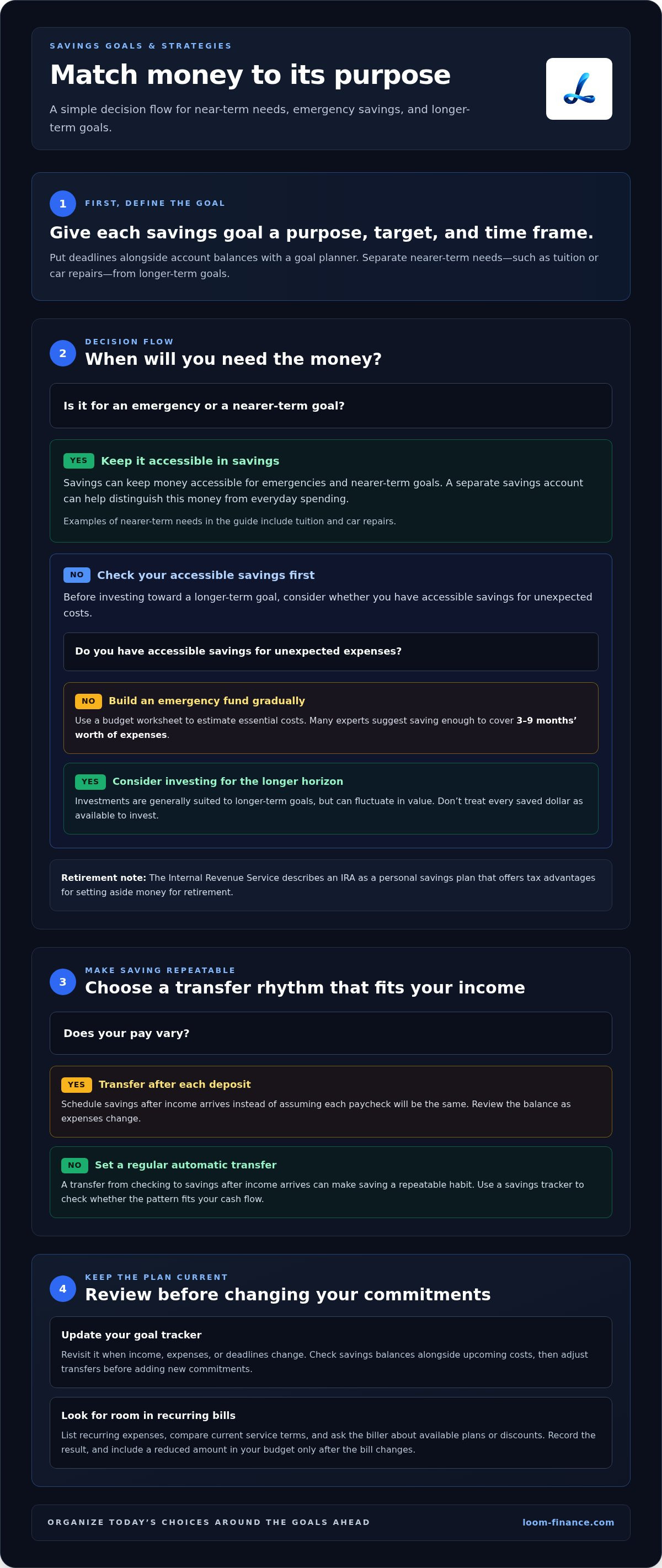
Give each savings goal a purpose, target, and time frame. A savings calculator can turn a future expense into regular contributions, while a spreadsheet can track progress and account balances. Separate near-term needs, such as tuition or car repairs, from longer-term goals to decide which savings deserve attention first.
An emergency fund helps cover unexpected expenses without relying immediately on borrowing or selling investments. Many experts suggest saving enough to cover 3-9 months’ worth of expenses. Use a budget worksheet to estimate essential costs, then build the fund gradually. A separate savings account can help keep this money distinct from everyday spending.
Automatic transfers can make saving a repeatable habit. Set a transfer from checking to savings after income arrives, then review the balance as expenses change. If your pay varies, schedule transfers after deposits rather than assuming each paycheck is the same. A savings tracker can show whether the pattern fits your actual cash flow.
College students can start with a small, specific goal, such as books, transport, or an unexpected expense. A campus budget worksheet can list financial aid, wages, and essential costs by term. When income arrives, set aside money for near-term bills first. Then transfer an amount that leaves enough for food and other planned expenses.
Savings and investments serve different purposes. Savings can keep money accessible for emergencies or nearer-term goals; investments are generally suited to goals with a longer time horizon and can fluctuate in value. According to the Internal Revenue Service, an IRA is a personal savings plan that offers tax advantages for setting aside money for retirement.
Before investing toward a goal, consider when you’ll need the money and whether you have accessible savings for unexpected costs. A goal planner can put deadlines alongside account balances, helping you see which funds are for near-term needs and which support longer-term plans. Don’t treat every saved dollar as available to invest.
Negotiating bills can free up room for savings without changing your core budget. List recurring expenses, compare current service terms, and contact the biller to ask about available plans or discounts. Record the result in a bill tracker, then direct any lasting reduction toward a named goal. Include the reduced amount in your budget only after the bill changes.
For a practical review, update your goal tracker when income, expenses, or deadlines change. Check savings balances alongside upcoming costs, then adjust transfers before adding new commitments. A personal finance management tool can help organize these moving parts as you work toward clearer savings priorities.
Spending categorization and transaction management
Transaction tracking turns purchases into a monthly view of expenses. Group them into categories such as housing, food, transport, and debt payments. A bank statement, spreadsheet, or budgeting app can show where your income goes. Review a month of entries, then compare each category with your spending plan.
Categories help explain changes, not just totals. If restaurant spending rises, separate takeout from groceries before adjusting your budget. If a car repair increases transport costs, label it as an unusual expense. Clear categories make reports easier to interpret and help distinguish routine costs from one-time purchases.
A spreadsheet can organize transactions and produce simple spending reports. It also lets you customize categories and add notes beside purchases. Your bank’s transaction list provides a basic record of account activity. Choose a method you’ll maintain, and correct miscategorized entries before relying on category totals.
For a useful monthly review, compare the current month with the previous one. Check income, total expenses, and changes in each category. Separate recurring transactions from one-off costs. For example, a larger utility bill may call for a different response than several unplanned purchases. Add a note beside the category to preserve context.
A pause can help interrupt impulse spending. Before an online purchase, wait five minutes and ask whether it fits your plan, meets a current need, or can wait. Add planned purchases to a list instead of buying immediately. Later, compare the list with your budget and choose what still matters.
For managing debt and improving credit, use a debt payoff calculator to compare repayment approaches, a payment calendar to track due dates, and a credit-monitoring tool to review score changes. Payment history and the amount of available credit you use together make up more than half of your credit score. A good credit score ranges from the mid-600s to the mid-700s, regardless of age.
Keep debt transactions separate from everyday spending. Record each payment’s date and amount, then compare the balance with the previous statement. This shows whether your payment plan is reducing what you owe. A financial advisor can help weigh options if your debts, income, and goals are difficult to assess together.
Use your monthly review to choose one clear adjustment. You might set a limit for a flexible category, plan a purchase in advance, or redirect spending toward a priority. Repeat the same tracking steps next month. Consistent categories make patterns easier to spot and help you choose a practical next move.
Bill negotiation and subscription management
A bill calendar, subscription list, and document folder can make household payments easier to manage. Start by listing each biller, amount, due date, and payment method. Add streaming plans, cloud storage, insurance, utilities, and memberships. Reviewing the list can reveal duplicate services and charges for services you no longer use.
Record monthly and annual charges in one place. A spreadsheet can sort subscriptions by renewal date, while a calendar can remind you to review them before renewal. Compare each service with your current needs, then cancel unused plans through the biller’s usual process. Keep a note of the cancellation date and confirmation for your records.
For bills you want to keep, review the latest statement before contacting the provider. Note the current plan, charges, and any service changes. Ask whether another plan or payment date better fits your budget. Some billers may let customers change their payment due date as long as they continue paying each month.
Approach a bill discussion with a clear request. For example, ask whether the provider offers a lower-cost plan with the features you use. Write down the representative’s response, any change made, and when it begins. Compare the next statement with your notes to see whether the adjustment changed the bill.
Personal finance software can organize household bills, while a separate business ledger can track work income and expenses. Keep business transactions separate from personal spending, even if you’re self-employed. For example, label a software subscription used for work separately from a household entertainment service. Clear records make monthly reviews more accurate.
Build a document system with folders for statements, receipts, insurance, taxes, and debt records. Use consistent file names, such as “Utility provider, statement month,” to find documents quickly. Store account details securely, and avoid putting passwords or full payment credentials in ordinary files. A payment calendar and document folder work well together.
Bill management also supports debt decisions. List each balance, due date, minimum payment, and interest rate in a worksheet. Paying on time supports a strong payment history; payment history and the amount of available credit used make up more than half of a credit score. Use the list to identify which payments need attention first.
To build a steady routine, review bills when statements arrive and subscriptions during a monthly money check-in. Update the calendar, file new documents, and note changes in interest or balances. If a bill rises, compare its details with the previous statement before changing other spending. This keeps records current and decisions grounded in actual charges.
Financial goals and retirement planning
Savings calculators, goal trackers, retirement account tools, and benefit estimators support different decisions. Use a goal tracker to set a target and monitor progress, then use retirement tools to understand future income and required withdrawals. Together, these tools can connect current saving and investing choices with longer-term plans.
Begin with a written list of financial goals. Add each goal’s purpose, target date, and current balance. A spreadsheet or mobile planning app can show how monthly contributions affect progress. Review the list when income or expenses change, then adjust contributions to reflect your priorities.
Choose a method that keeps near-term needs separate from retirement saving. A goal planner can organize expected costs, while an investment account tool can display balances and activity. Consider when you’ll need the money, how much access you need, and how changes in investment value could affect your plans.
For retirement estimates, the Social Security Retirement Planner provides a personalized estimate of Social Security benefits. The Required Minimum Distribution Calculator estimates withdrawals required by IRS regulations from retirement accounts at different ages. Use these tools to understand how estimated benefits and required withdrawals fit into a broader retirement plan.
According to the Internal Revenue Service, an IRA is a personal savings plan that offers tax advantages for setting aside money for retirement. An IRA can be part of a retirement plan, but where to save depends on your goals, access needs, and overall finances. Keep account information together so you can review the full picture.
A written plan can make long-term goals easier to revisit. In Charles Schwab’s Modern Wealth Survey, 36% of Americans reported having a written financial plan. Use a document or planning app to record your goals, contributions, and next review date. During each monthly review, compare actual balances with your targets and update the plan.
Keep monitoring practical. Check progress on a set schedule, note what changed, and decide whether your next step is saving, investing, or adjusting a goal. A mobile calendar reminder can prompt a review without requiring constant attention. This approach links everyday money choices with future plans.
Organize your financial goals with a clear view of your priorities, balances, and next steps.
Financial planning can help you prioritize expenses, budget, and reach savings goals. Start by separating essential expenses from flexible spending, then compare your plan with what’s actually leaving your accounts. This can clarify which contributions are realistic while keeping your priorities in view. If a priority changes, revise the budget and decide what to adjust before changing longer-term savings. Keep the process simple enough to repeat, using each review to identify a practical next step rather than trying to change everything at once.
Financial planning can support safer money and spending habits, including maintaining an emergency fund. Consider how a reserve for unexpected costs fits into your budget alongside other goals. Record the amount you want to set aside and track its progress separately from money intended for planned purchases or retirement. Revisit the balance as expenses and priorities change, and adjust contributions when needed. This keeps short-term financial resilience visible as you work toward longer-term goals.
LOOM: Personal finance management tools
LOOM combines personal finance management tools with Financial Guides to help you organize spending, bills, savings, and future goals. Use these resources when your budget feels scattered or when you’re weighing how to balance debt payments with saving and investing.
For decisions that need personal context, LOOM’s personalized financial advice and AI financial coach can help you consider your options and plan practical next steps. These resources support your decision-making, but don’t provide loans, credit products, or investment management.
Ready to bring your money priorities into clearer focus? Explore LOOM’s tools and guidance.
Make Your Next Money Decision With More Clarity
Your next step doesn’t need to solve every financial priority at once. Choose one decision you can act on now, such as setting a debt payment plan, protecting savings for a near-term need, or defining a retirement goal. Write down what matters, what you can commit to, and when you’ll review your progress. This gives each choice a clear purpose without making money management an all-or-nothing project.
Use personal finance tools to keep your decisions connected as circumstances change. LOOM’s personal finance management tools, Financial Guides, and personalized financial advice can help you organize your thinking and choose practical next steps. The aim isn’t to make every decision perfect. It’s to build a money routine you understand and can return to when priorities shift.
Take the next step at a pace that feels manageable. Contact LOOM to discuss your options and find a clearer way to move forward with your financial goals.
Frequently Asked Questions
Help me decide: Should I pay down debt, save or invest?
Keep essential bills current, then compare debt interest with your need for accessible savings. If a high-interest balance is growing, extra payments can reduce future interest costs. If you have little cash set aside, build a reserve for unexpected expenses before committing more money to investments. For example, a car owner might prioritize a repair cushion before increasing long-term contributions. Revisit the order when your income, expenses, or goals change.
What are the best personal finance apps in 2026?
The right fit depends on the task you want an app to handle. A bank or credit union app works for reviewing accounts held there. LOOM can help organize transactions and examine reports, while Google Sheets or Excel suit people who prefer building their own budget. If you’re comparing options, test a real task, such as sorting a recent purchase or viewing recurring charges, before moving all your records.
How do budgeting apps compare in features and price?
Compare the features you’ll use with the app’s stated plan and ongoing cost. Some tools focus on spending categories and reports; others emphasize bill tracking, goal planning, or account views. Consider whether you need account connections or prefer manual entries, then weigh those features against the cost. A useful comparison is whether the app saves effort on a task you already do, such as preparing a monthly spending review.